Zupiters Brush: A Web Designer’s Dream Display Font for Digital Branding
Let me take you back to a recent project: a boutique coaching website redesign. I was staring at the homepage hero section, trying to find the right font to pair with a soft watercolor background and a minimalist layout. I had a clear vision—something elegant yet modern, expressive but still readable. That’s when I dropped in Zupiters Brush, and everything clicked. The font brought a warm, human touch to the design without sacrificing the clean digital aesthetic I was aiming for.
What Makes Zupiters Brush Stand Out in Web Design
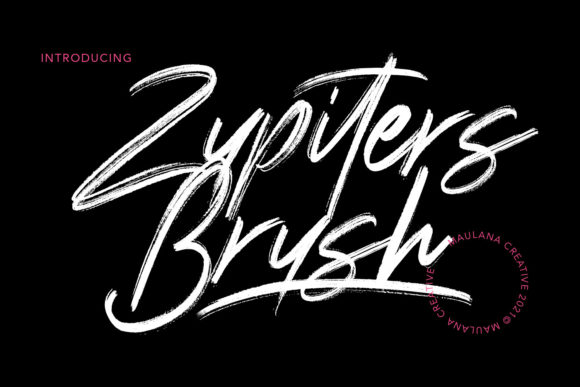
Zupiters Brush is a flowing, brushed display font that carries the charm of hand-drawn lettering with the polish of a premium digital typeface. It has a soft, organic texture that mimics brush strokes, giving it a distinctive personality. Unlike many script fonts that can feel overly ornate or hard to read, Zupiters Brush strikes a perfect balance—it’s expressive enough for branding moments but still legible in key areas like headlines and call-to-action buttons.
When I tested it in the hero section of the coaching site, it felt like the brand voice came alive. The font has a slightly bouncy baseline and natural ligatures that give it movement, making it feel dynamic on screen. It's especially effective for hero text, logo treatments, and short, impactful statements.
Real-World Use: Landing Pages, Hero Sections & Brand Headers
One of the first places I used Zupiters Brush was in the hero headline: “You Are Worthy of a Life You Love.” The font’s soft curves and flowing style made the message feel personal and heartfelt. I paired it with a light, textured background image and a simple sans-serif for the supporting text, and the contrast worked beautifully.
I also tested it in a product landing page for a digital course. The headline “Rediscover Your Creative Spark” was set in Zupiters Brush, and again, it added a sense of warmth and authenticity. It’s the kind of font that makes users pause and feel something—perfect for branding moments that need emotional resonance.
Readability and Responsiveness: What to Watch For
While Zupiters Brush shines in large, short-form text, I found it less ideal for longer paragraphs or small interface elements. On mobile, it looked great in headlines but started to lose clarity at smaller sizes—especially when used over image overlays or with low contrast. I made sure to keep it above 24px and used it only where visual impact was more important than detailed reading.
Another consideration was accessibility. Since the font has decorative strokes and variable line weights, I avoided using it for navigation labels, form fields, or subheaders where clarity is key. Instead, I reserved it for hero text and brand accents, pairing it with a clean sans-serif like Montserrat or Lato for body content and buttons.
Font Pairing Tips for Web Designers
One of the most enjoyable parts of using Zupiters Brush was experimenting with font pairings. Because it’s such a strong visual element, it works best when balanced with something neutral. I found that a simple sans serif like Open Sans or a clean serif like Playfair Display created a modern, editorial feel—perfect for creative brands, lifestyle blogs, or wellness websites.
For a boutique online store I was designing, I used Zupiters Brush for product names and “New Arrival” banners, then paired it with a crisp sans-serif for descriptions and pricing. This helped maintain a cohesive visual hierarchy while letting the font stand out where it mattered most.
Technical Notes: Formats, Licensing & Web Performance
From a technical standpoint, Zupiters Brush comes with a range of webfont formats including WOFF, WOFF2, and TTF, which made it easy to integrate into the website using Google Fonts and @font-face declarations. I was also glad to see that it supports multilingual characters and includes ligatures and alternate glyphs, which gave me more design flexibility.
It’s important to double-check the licensing before using any premium font, especially for client work or commercial websites. Zupiters Brush is available with a commercial license, so I had no issues using it across multiple web projects, including online stores, landing pages, and branded content.